
What is Claude? Chat, Cowork and Claude Code explained
Learn what Claude is, how Chat, Cowork and Claude Code differ, and where each one can help a small business without giving AI too much control.

Claude starts with a large language model
Claude is an AI assistant made by Anthropic. Behind it is a large language model, usually shortened to LLM.
An LLM is trained to recognize patterns in a very large amount of language. When you give it an instruction, it uses those patterns to build a response. That is why Claude can explain a document, draft an email, compare options or help you think through a problem in normal language.
The same basic technology can also use tools. Depending on how you use Claude, it may search the web, work with files, create documents, use a browser or change computer code.
Claude is the AI. Chat, Cowork and Claude Code are different ways of using it.
This distinction matters because the risk changes when Claude moves from suggesting work to taking actions. A chat response is easy to ignore. A tool that can edit files, use a website or run commands needs clearer boundaries and closer review.
Anthropic's introduction to Claude explains the basic assistant and where you can access it.
Key takeaways
- Claude is an AI assistant and large language model made by Anthropic.
- Claude Chat is best when you want to think, ask, draft or review together.
- Claude Cowork can carry out longer, multi-step knowledge work using files, tools and browser actions.
- Claude Code is built for software work and can read, change and test code.
- Start with Chat. Give Claude more access only when the task genuinely needs it.
- You remain responsible for the facts, permissions and final result.
The three main ways to use Claude
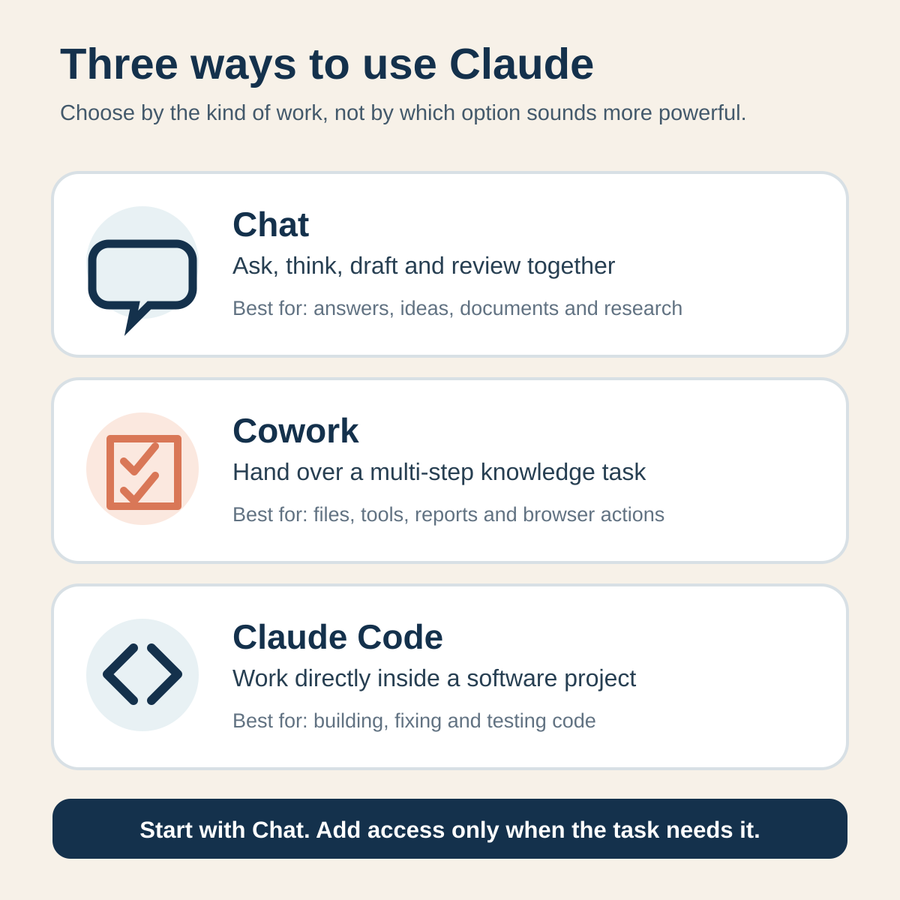
The names can make Claude sound like three separate products. It is easier to think of one assistant with different levels of access and independence.
Claude Chat: think and draft together
Claude Chat is the normal conversation you open on the web, desktop or mobile app. You ask a question, attach a document or describe a task. Claude replies, then you steer it with follow-up instructions.
This is the best place to start. Use Chat when you want to:
- understand a topic or long document
- develop and challenge an idea
- draft an email, proposal or process
- compare options before making a decision
- search for current information and review the sources
You can create Projects to keep related chats, instructions and reference files together. Claude can also put larger work into Artifacts: documents, diagrams, simple tools or web pages you can edit and reuse.
Chat still needs your direction. Claude will not know your customers, standards or business rules unless you provide them.
Claude Cowork: hand over a multi-step task
Claude Cowork is for work that needs more than a response. You describe the outcome, and Claude can plan the job, break it into steps, work with files, use connected tools and return a finished deliverable.
You might ask Cowork to organize meeting notes, turn several source files into a report, clean a spreadsheet or prepare a presentation. On supported setups, it can also work with local files and take actions in a browser.
Anthropic describes Cowork as the agentic capabilities of Claude Code applied to knowledge work without requiring a terminal. In plain language, it can do parts of the job rather than only tell you how.
That extra ability brings extra risk. A poor answer in Chat stays in the conversation. A poor Cowork action could change a file, enter information on a website or use a connected service. Keep approval checks on for work involving money, messages, customer information or important records. Anthropic's Cowork guide also notes that it uses more of your allowance than a standard chat.
Claude Code: work directly on software
Claude Code is made for developers and people managing software projects. It can inspect a codebase, edit several files, run commands, test its changes and work with Git.
You do not need Claude Code to draft a customer email or summarize a policy. You may use it if your business is building a website, internal tool, app or automation and you want Claude to work inside the project rather than paste code into a chat.
Claude Code is available through a terminal, coding editors, desktop and the web. Anthropic's Claude Code overview describes it as a coding assistant that can build features, fix bugs and automate development work.
It asks for permission before many actions and limits where it can write by default. Those controls help, but they do not prove the code is correct or safe. Someone still needs to review the changes and verify the result.
Choose the lightest version that can do the job
More access is not automatically better. Pick the lightest version that can complete the task.
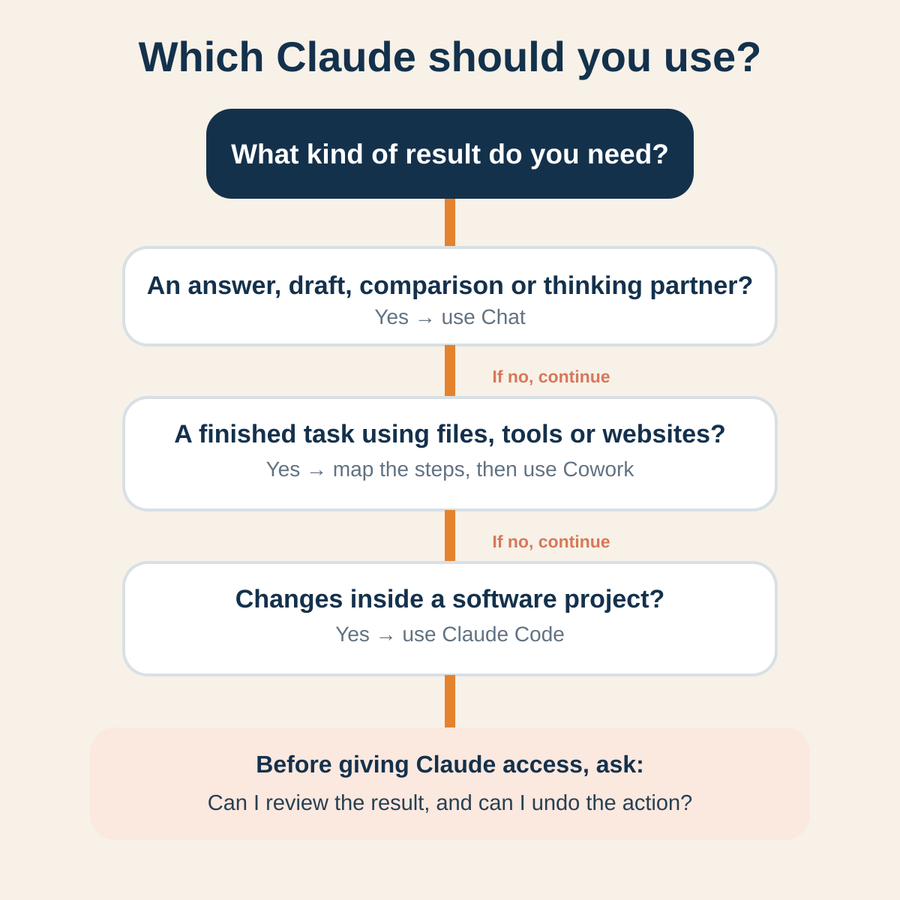
Choose Chat when you want an answer, a draft or a thinking partner. This covers most first uses in a small business.
Choose Cowork when the job has several steps and needs Claude to work with files, tools or websites. Use it when you can describe the outcome clearly and inspect what it produces.
Choose Claude Code when the work happens inside a software project. If you do not work with code, you probably do not need it.
A good adoption path is:
- Test the task in Chat and learn what context Claude needs.
- Write down the instructions, examples and checks that produced a good result.
- Move the task to Cowork only if execution, file access or repeatable steps would save meaningful time.
- Keep human approval around actions that are hard to reverse or could affect someone else.
This follows a simple operations rule: understand the process before you automate it. Giving an AI more freedom will not repair a task that is unclear to the people doing it.
Where Claude can help a small business
Claude is useful when the work depends on language, documents or structured thinking and you can judge the result.
It can help you turn rough notes into a proposal, compare supplier documents, summarize research, draft a procedure, prepare questions for a meeting or find themes across customer feedback. Projects can keep your background material and working instructions together so you do not start from zero each time.
For longer work, Cowork can produce reports, spreadsheets and presentations. Give it the repetitive parts while keeping judgement and approval with a person.
Start with low-risk work. Do not begin with payroll, legal advice, customer complaints or anything that can send, pay, publish or delete without a careful review.
Know where to slow down
Claude can produce information that sounds convincing but is wrong. Anthropic says users should not treat it as a single source of truth, especially for high-stakes advice. When Claude searches the web, open the important citations and check that the original page supports the answer.
Be careful when:
- the answer affects legal rights, tax, health, safety, pay or finances
- Claude has access to confidential customer or employee information
- an action can send a message, make a payment, publish content or delete a file
- you cannot check the result yourself
- the work will represent your business publicly
Privacy also depends on the type of account and its settings. Anthropic says consumer chats and coding sessions may be used to improve Claude when the user allows model improvement, while commercial products such as Team, Enterprise and the API are not used for training by default. Review the consumer data guidance and commercial data guidance before using real business information.
Do not paste passwords, payment details or unrestricted customer records into Claude. Remove identifying details where possible, limit access to what the task needs and check your obligations before staff use any AI tool.
Try Claude Chat on one task this week
Choose one repeated task that is low risk and easy for you to review. A meeting agenda, enquiry reply or summary of your own notes is a good start.
- Find a good past example and remove private details.
- Open Claude Chat and explain the task as if you were briefing a new employee.
- Give Claude the audience, background, limits and required format.
- Review the answer and correct it in plain language.
- Save the instructions if the result is faster and still meets your standard.
Do this next
Write down one task you want Claude to help with. If you only need an answer or draft, use Chat. If the task must work through files or tools, map the steps first before you try Cowork. Use Claude Code only when the work is software.